

The LCA expert, augmented by AI
AI speeds up your modeling, every calculation saves a version of your LCAs, a dashboard shows your whole range and two risk analyses join the environment.
Released on
Versionv2026.05.20
On this page
- At a glance
- BOM import
- Connect Sapiologie to your AI agent: Sapiologie launches its MCP server
- Beta: chatbot built into the application
- LCA versioning
- Dashboard to analyze entire ranges
- Comparative analyses of product ranges
- Geopolitical and social risk analysis
- Detailed composition of a supplier product
- Smart product duplication
- More ergonomic zoom handling in the tree
- Categorization of app elements
- Undo or redo an action
- Enhanced user management
- Audit log for admin users
- Sapiologie ISO 27001:2022 certified
- Improvements
- Fixes
- Learn more
At a glance#
This release is our most ambitious to date. On the agenda: AI comes to Sapiologie to speed up your modeling, the versioning of your LCAs finally protects your history, a a brand-new dashboard gives you a panoramic view of your product ranges, and two new risk analyses (geopolitical and social) enrich your supply chain management. On the trust side, Sapiologie is now ISO 27001:2022 certified since January 2026.
- NewBOM import: drop in any Excel or CSV file, Sapiologie detects the format and proposes a structured BOM.
- NewThe MCP server, to connect the application to your agents.
- NewLCA versioning: each click on Calculate takes an exact snapshot of your results.
- NewDashboard to analyze entire ranges, on a single screen.
- NewGeopolitical and social risk analysis, beyond climate.
- NewSapiologie ISO 27001:2022 certified, since January 2026.
BOM import#
Artificial intelligence enters the daily work of your modeling. Import or describe your BOM, and Sapiologie proposes a BOM structure ready to edit, then ecoinvent suggestions to model your processes. You approve, you adjust, you stay in control.
Smart BOM importer and AI-assisted generation: drop in any Excel or CSV file, Sapiologie detects the format and proposes a structured BOM. The Detect with AI even converts atypical files into a hierarchical BOM ready to edit. No more filling in our template by hand.
AI can be enabled from the company settings.
Connect Sapiologie to your AI agent: Sapiologie launches its MCP server#
Sapiologie launches its MCP server, to connect the application to your agents.
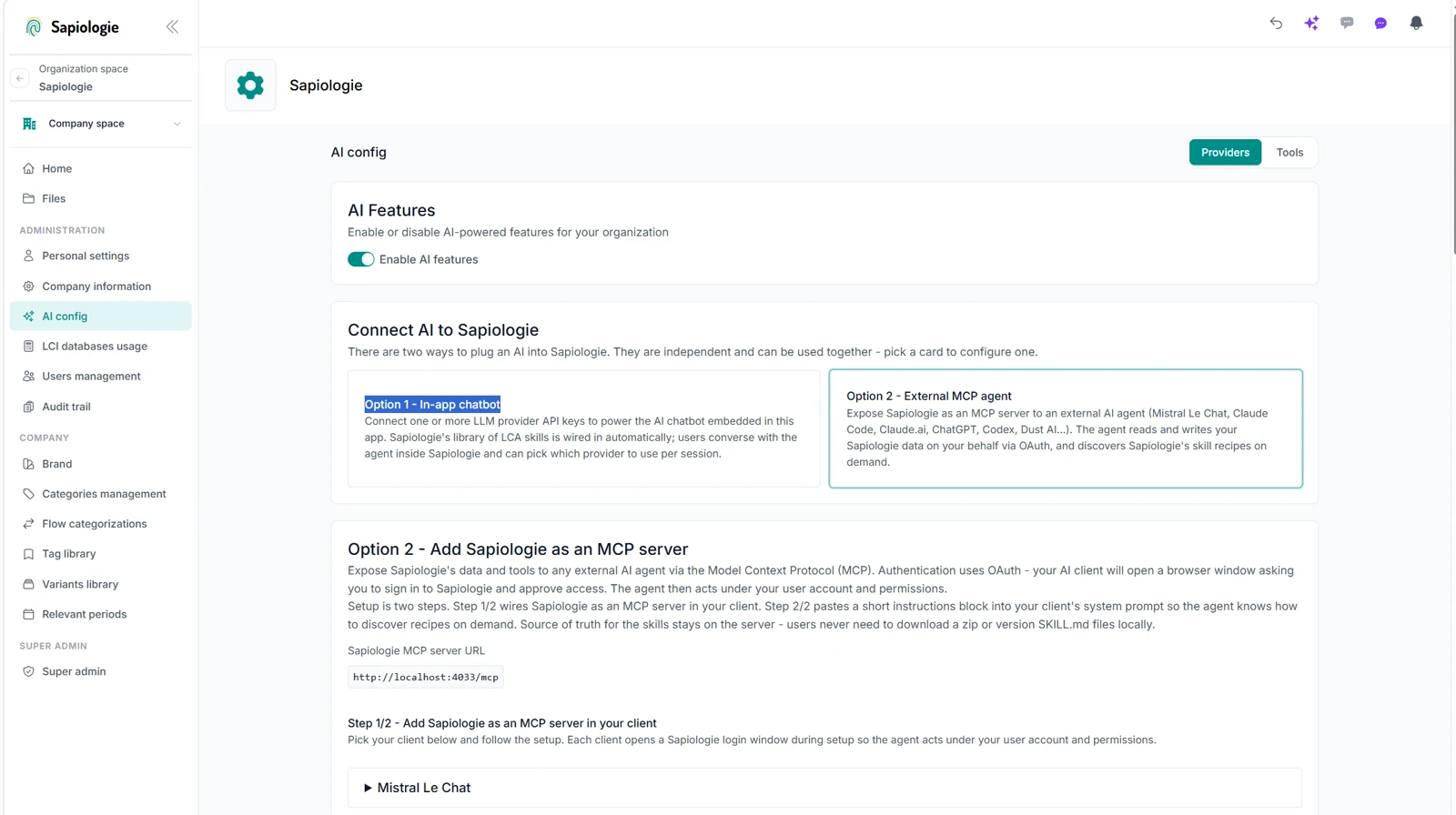
Where to find itCompany space › AI config
Beta: chatbot built into the application#
In addition to MCP, Sapiologie includes, in beta, a chatbot connectable to your LLM APIs (OpenAI protocol compatible).
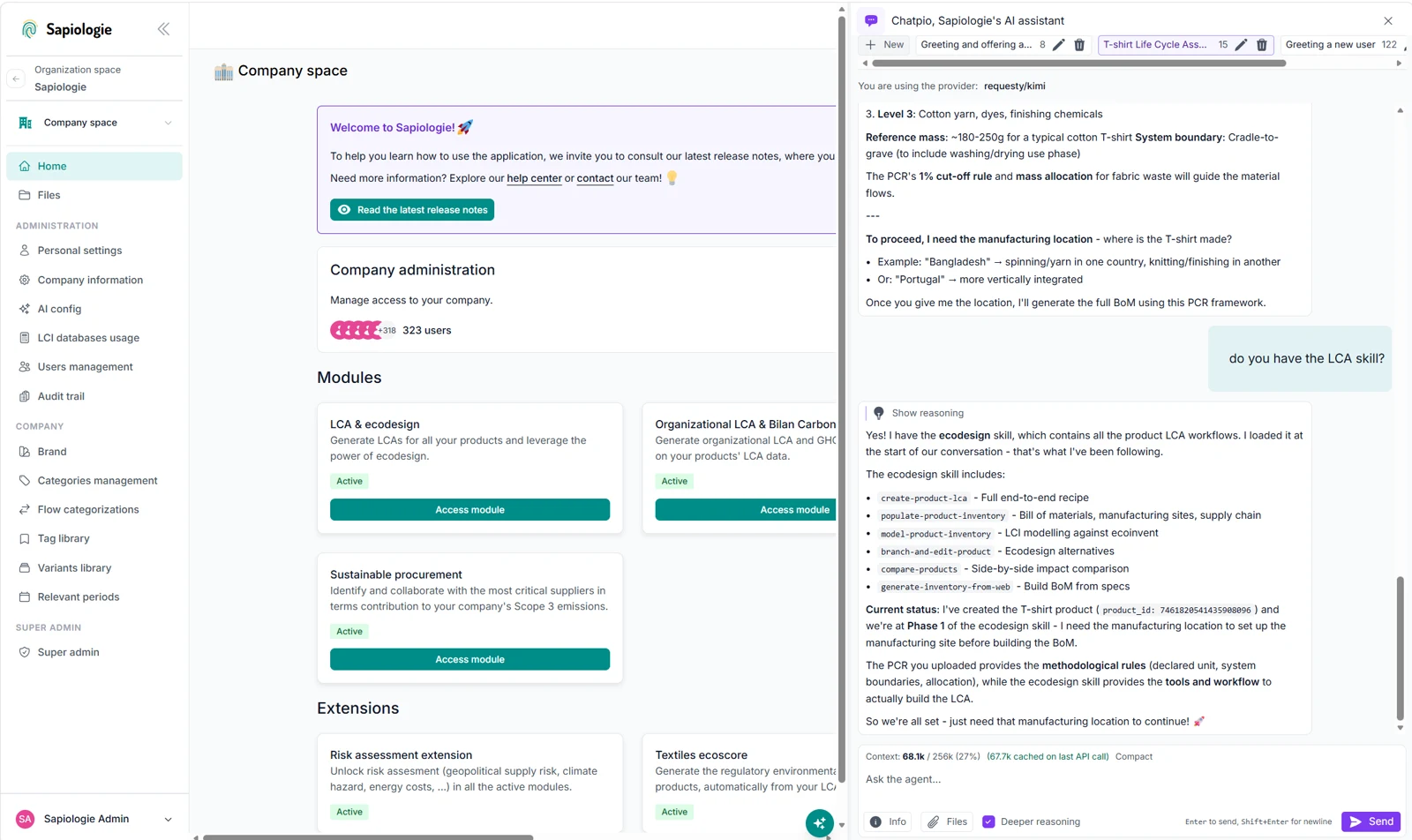
For our experienced users: in your personal settings, enable “Beta” mode to test the latest features in advance, and send us your feedback.
LCA versioning#
Never again risk losing your results when you update an inventory or switch ecoinvent versions. Sapiologie now lets you save versions of your LCAs and move between them at any time.
Save versions of your impact results. Each click on Calculate takes an exact snapshot of your results. You can go back to these versions and compare them whenever you want.
The LCA is no longer recalculated automatically on the environmental impacts page: a button Compute LCA clarifies when your results are up to date. If the inventory or modeling changes, the Recompute LCA appears.
Dashboard to analyze entire ranges#
The new Products dashboard gives an overview of the impacts of your entire range, on a single screen.
Add periods with your sales volumes and compare each product's impact on the indicator of your choice (climate, water, PEF, etc.). Volume weighting finally makes your actual contributions readable.
Recompute the LCA for one, several or all of your products at once from the dashboard, then receive a notification once the calculations are complete.
Comparative analyses of product ranges#
Compare the environmental profiles of several products in your range side by side to identify the best performers and the points of attention, and to guide your ecodesign decisions across your whole portfolio.
Geopolitical and social risk analysis#
Two new analyses map the risks associated with your supply chain beyond climate.
Geopolitical risks: identify tension zones, critical dependencies and vulnerabilities tied to the origin of your supplies.
Social risks: working conditions, human rights and governance indicators are scored product by product.
Both analyses are available from the Products dashboard, in the Risks analysis tab, next to the environmental analysis.
Where to find itProducts dashboard › Risks analysis
Detailed composition of a supplier product#
You can now choose the method to detail a supplier product in your process tree. The new method Detail composition lets you enter the items that make up your supplier product directly, without bloating the tree.
- Select the Detail composition method on the supplier product.
- Add your components.
- Components do not appear in the process tree: they are modeled from Modeling › Procurement.
Smart product duplication#
Need to create a variant of an existing product? Smart duplication copies the entire structure (process tree, models, parameters) to start a new LCA without starting from scratch.
More ergonomic zoom handling in the tree#
Previously, when scrolling the process tree page, it was common to zoom in or out by accident when passing over the tree area. We changed the zoom behavior so that it is more distinct from scrolling. To zoom in or out on the tree, you now either hold the Ctrl key while scrolling or, if you use a trackpad or a touch mouse, spread two fingers apart as on a touch screen.
Categorization of app elements#
Organize your products, models and processes with a system of custom categories. A clear way to structure your library and find what you are looking for, even within very large ranges. Categories also drive the grouping in the Products dashboard.
The Products, Supplier products and Modeling pages can be filtered by these categories.
Undo or redo an action#
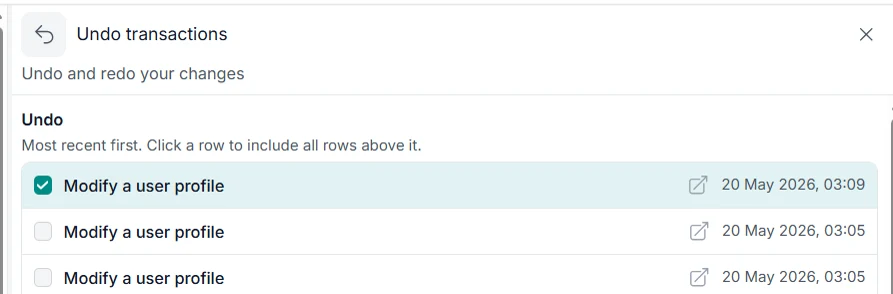
There is now, at the top right of the screen, in the navigation bar, an icon with a backward arrow. Clicking this icon opens a panel on the right of the screen that shows all the latest transactions you have made in the organization's database, until a transaction has been made by another user. You can then select one or more of your latest transactions and undo them (equivalent to Ctrl+Z) or reapply them (equivalent to Ctrl+Y). You can also open this panel with Ctrl+Z or Ctrl+Y.
Enhanced user management#
The user administration interface gains finesse: more granular role management, activity tracking, and a clear overview of platform usage across your organization.
Audit log for admin users#
We added an audit log in the sidebar of the company space, in the “Administration” section. This audit log shows all the actions performed in the organization, in reverse chronological order and by user, as well as the full login history by user.
Where to find itCompany space › Administration
Sapiologie ISO 27001:2022 certified#
Your data security is our priority. Sapiologie is now ISO 27001 certified (2022 revision), the international reference standard for information security management. Our commitment to protecting your data is now audited by an independent third party.
Improvements#
- ImprovedInterface design overhaul: the entire interface has been reviewed to offer a clearer, more consistent experience: new typefaces, better visual hierarchy, redesigned components. Sapiologie gets a fresh new look.
- ImprovedEmission types included for users of organizational LCA and Bilan Carbone.
- Improvedecoinvent search: significant performance optimization.
- ImprovedImpact assessment: faster calculation and smoother navigation.
- ImprovedCybersecurity: many internal improvements to strengthen the protection of the platform.
- ImprovedESA database integration for aerospace.
Fixes#
- FixedMore reliable calculations: a transport node disabled in the process tree is no longer counted in calculations.
- FixedThe range analysis page can handle empty categories.
- FixedDecimal numbers are read correctly from imports and forms.
- FixedTransport lines no longer remain visible on the Modeling page when a transport node is disabled.
- FixedSupplier products without mass no longer appear in transport modeling.
- FixedComparison of LCI models works on modified EN 15804 activities.
- FixedTranslation improvements.
Learn more#
La FAQ has been updated.
For any question or feedback, contact the support team through the FAQ section of the application.
Summarize with